
| HTML |
|---|
<!---Using free svg icons to enhance the look of this page---> <link rel="stylesheet" href="https://use.fontawesome.com/releases/v5.5.0/css/all.css" integrity="sha384-B4dIYHKNBt8Bc12p+WXckhzcICo0wtJAoU8YZTY5qE0Id1GSseTk6S+L3BlXeVIU" crossorigin="anonymous"> <!---Using different fonts for better titles---> <link rel="stylesheet" href="https://fonts.googleapis.com/css"> |
|
Additional Notes and Workarounds
| Product/Service | Notes and Workarounds | Last Updated |
|---|---|---|
| External IT Services Status (Vendor Status Information) | UWF relies on many third-party systems to function. Many of these third-party systems have their own status webpages that the public can access. Click the link to the left to see the statuses and links for these pages. | N/A |
Users don't see the Remove from workspace option, when they try to remove files from their Google Workspaces.
Google is aware of this issue, and is actively working towards a resolution.
A temporary workaround is to
- Create a space called "Junk", "Unused", or "Trash."
- Move unneeded files to this new workspace.
- Once this new workspace gets filled up with 25 files, then delete that workspace.
- Repeat steps 1-3 as needed.
Some users have reported being prompted to sign into Adobe while using the software. To prevent this message from reappearing, users can click the sign in button and sign in using their Google account. Users may need to exit and relaunch adobe after signing in to continue using the software.
Please visit Signing in to Adobe Pro for additional details.
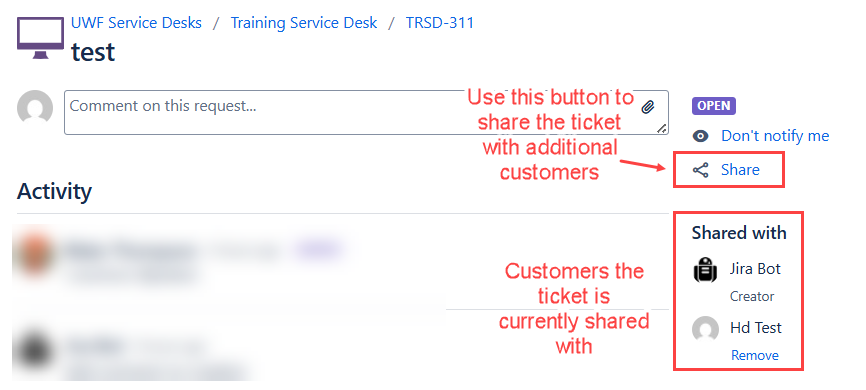
| Sharing Jira Tickets | As of the newest Jira upgrade on 11/18/2025, users listed under Shared With on the right side of a Jira ticket can no longer “@ mention” other users. To share the ticket with another customer, please use the Share button on the right side instead. Once shared, the recipient will automatically receive notifications for all future comments. Service Desk Team members will still be able to @ mention other team members.
| |
| Timesheet Approvals | After the latest upgrades were installed in Banner over the weekend, users have been unable to access timesheet approvals, both as the original approver and as proxy. To fix this issue, please clear your browser cache and attempt access again. If you are still experiencing issues after clearing your cache for all time, please submit a Jira ticket or contact the Help Desk. |
Alert Handling
How do we define an alert
All of the following must apply:
- We can consistently reproduce an unexpected behavior.
- An issue is generating a number of responses from the UWF community.
- An alert is posted either on this page, or our main Technology Alerts page.
- Either ITS or the third-party vendors are aware of the issue.
- Either ITS or the third-party vendors are actively working to resolve the issue.
- Notices* will be posted if an outage is planned for high impact services.
* Other changes may occur during our posted maintenance windows that will not have a formal notice.
What to expect from an alert
ITS will make best efforts to provide the following for each alert:
- What is expected to occur
- What actually occurs
- What are the workarounds for the issue (if there are any)
- Which departments and third-party vendors are working to resolve the issue
- When was the alert posted
- When was the alert closed
| Include Page | ||||
|---|---|---|---|---|
|