
-
Created by
 Jeremy Boccabella, last updated by Alex Jarstad on Dec 16, 2025
2 minute read
Jeremy Boccabella, last updated by Alex Jarstad on Dec 16, 2025
2 minute read
Overview
Follow the instructions below to connect your Windows 11 device to eduroam.
Instructions
Step 1
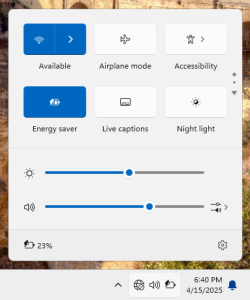
Click on the network icon in the system tray.

Next, click the icon for "Available" networks.
Step 2
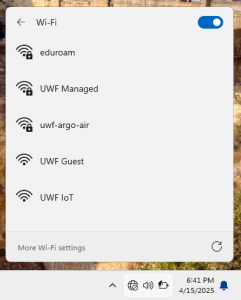
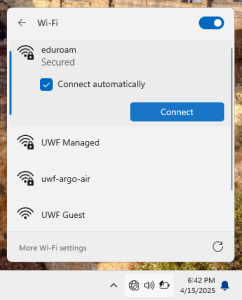
Select eduroam from the list, ensure Connect automatically is checked, and click Connect
Step 3
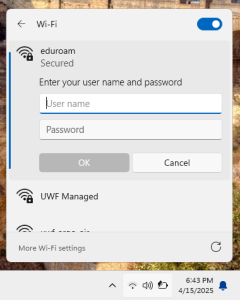
Enter your school's credentials (full email address and password) in the fields and click OK.
Step 4
Click Connect and you should now be connected.
Please Note: If you change your ArgoNet password after connecting to Eduroam, you must forget the Eduroam Network prior to reconnecting.