
-
Created by
 Unknown User (kmeyer), last updated by Krystena Keebler on Jun 18, 2026
2 minute read
Unknown User (kmeyer), last updated by Krystena Keebler on Jun 18, 2026
2 minute read
Overview
Changing the grade mode of a course could affect enrollment status, financial aid, etc. Please check with all the appropriate offices before changing the grade mode of a course.
With the approval of the student’s assigned Academic Advisor, undergraduate students may take selected courses on a Pass/Fail (P/F) basis using the Grade Mode Change Request form. All grade mode changes must be submitted to the Office of the Registrar by the date listed in the University Catalog. It is the responsibility of the student to understand the restrictions and implications surrounding the usage of Pass/Fail and Audit grades as outlined in the University Catalog.
For additional information, please see the Pass/Fail Grading Option and Audit Grading portions of the Registration Policies and Procedures.
Viewing Grade Mode
Depending on the course, students may have the option to select Pass/Fail and/or Audit grade mode options. If the desired grade mode option does not appear in Step 2 below, then that grade mode is not an option for the course.
- Log into MyUWF and access the Registration Menu app. Then, click on the "Registration and Planning" link.
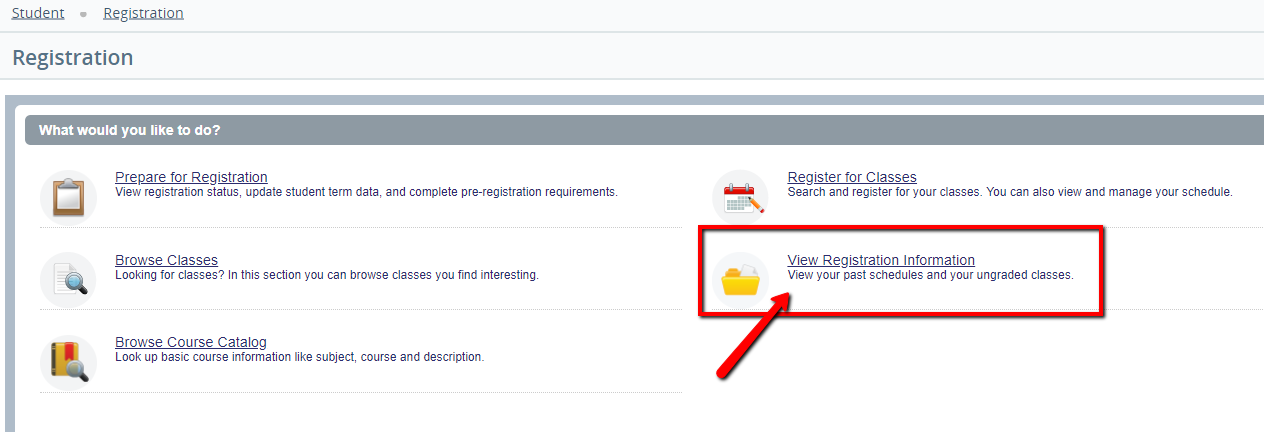
- Select "View Registration Information".
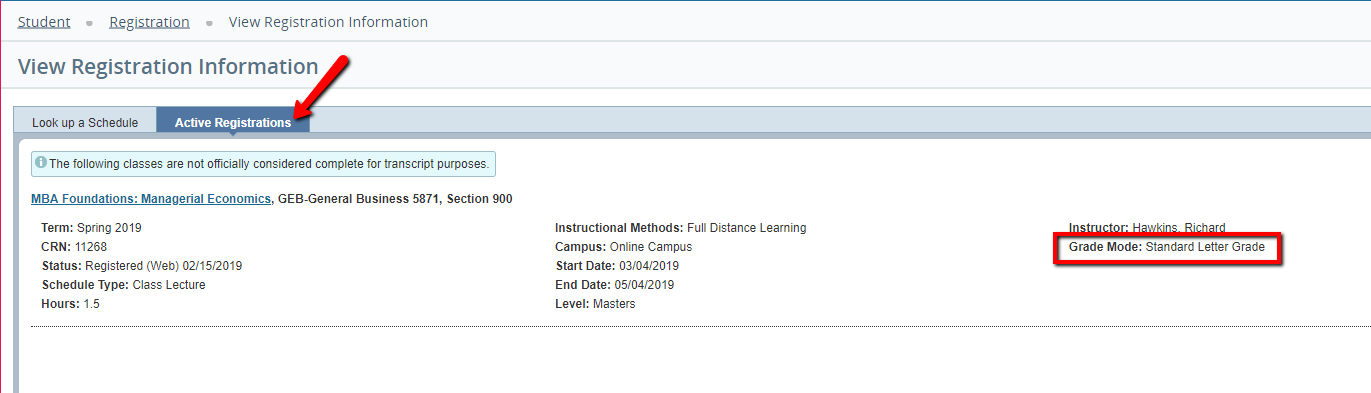
- Click the "Active Registrations" tab. The details within this view will show the grade mode for the course.
Related articles