
...
Zoom Phone is designed to function primarily through the Zoom Workplace app on desktop or mobile devices.
Each user is provided one funded device, typically typically a headset that connects directly to your computer (via USB or Bluetooth) and is fully compatible with the Zoom app.
A business justification is needed required to evaluate the need for traditional physical desk phones (see below for additional details).
All requests for traditional physical desk phone requests phones will be reviewed and discussed with the department.
Since Because traditional physical desk phones
should rarely be neededare expected to be used only in limited scenarios, they may
come at an result in additional cost to the department.
Users with a functional headset do not need to request new hardware.
| Info | ||
|---|---|---|
| ||
If a physical desk phone is needed, provide a clear business justification explaining why a softphone solution is not sufficient. Justifications may include safety requirements, shared use, public access, accessibility needs, or operational constraints. Describe how the device will be used (e.g., reception desk, lobby phone, conference room, emergency use, shared workspace). Please add this business justification to the notes section for each line. |
Available Hardware Options:
| Hardware Option | Link | Picture | Connection Type | Best For... | Wired (USB-A) | Logitech H391 (981-000014) | USB-A |
| . | Wired (USB-C) | Logitech H391 (981-001574) | USB-C | Modern laptops and MacBooks|
| . | ||||
| Bluetooth Wireless | Logitech 981-001468 |
| Wireless | High Users needing high mobility. Note: Older desktops Some desktop computers may require a USB Bluetooth adapter (dongle). See below for additional details. |
| Physical Desk Phone | Poly Edge E350 |
| Corded | Requires Business Justification. Reserved for shared spaces, reception areas, or high-volume use cases (long on-hold times, etc.) |
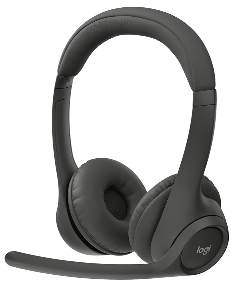
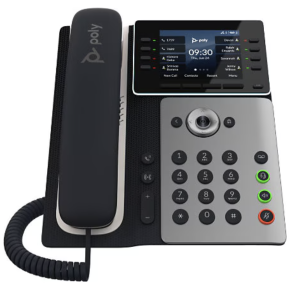
...
The following sections provide additional guidance and context to assist you in completing each part of the intake questionnaire accurately and efficiently.
A. How to Successfully Complete the Intake Questionnaire
Completing the intake questionnaire is one of the most important responsibilities of the POC. Because this information directly impacts system configuration, hardware distribution, and call routing, it is essential that responses are as accurate and complete as possible.
To make this process more manageable, POCs are strongly encouraged to leverage existing team communication channels rather than gathering all information independently.
Recommended Approach
- Collaborate with Leadership: Work with your department leadership to confirm staffing needs, shared lines, and operational workflows.
- Use a Team Meetings: Leverage an upcoming staff meeting(s) to review departmental lines, hardware needs, and call handling. This helps gather input efficiently and ensures alignment.
- Follow Up as Needed: Reach out individually for role-specific details such as feature needs (SMS, international calling) or hardware preferences.
| Info | ||
|---|---|---|
| ||
Subject: Action Required: Zoom Phone Transition & Information Request Hi Team, The University of West Florida is transitioning from its current phone system to Zoom Phone. This upgrade will provide a more flexible, modern communication experience by allowing you to make and receive calls directly through the Zoom Workplace app on your computer or mobile device. What This Means for YouOur department will be adopting a “soft phone” approach, meaning most users will no longer use a traditional desk phone. Instead, calls will be handled through Zoom using a headset connected to your computer. Each user is eligible for one funded device (typically a headset), and traditional desk phones will only be provided in limited cases where there is a clear business need (e.g., shared spaces, reception areas, or specific operational requirements). Information NeededTo ensure a smooth transition, I need a few details from each of you. Please review and reply with the following information:
If you select a Physical Desk Phone, please include a brief business justification explaining why a Zoom (soft phone) solution will not meet your needs. TimelinePlease send your responses by [INSERT DEADLINE] to help us stay on track with the migration timeline. If you’re unsure about any of the options, feel free to reach out - I’m happy to help. |
B. Departmental Lines: Managing Your Operations
The Departmental Lines tab captures all departmental and shared (non-personal) lines. Follow the steps below to ensure your data is complete and accurate:
...
Confirm that all existing phone lines are listed that are currently published, assigned, or in use within your department are listed.
...
Step 4: Confirm the Location of Any Physical Phones (Column C)
For any line
where you currently have a physicalassociated with a traditional physical desk phone,
pleaseprovide the building and room number.
Accurate room-level information is required for installation planning and asset tracking.
...
Step 7: Notes & Configuration Details (Column G)
The Notes column is one of the most important parts of the questionnaire. Providing detailed context here helps ITS accurately configure your department’s phone system and reduces the need for follow-up clarification.
Provide additional details for each line to guide ITS configuration, including but not limited to:
...
Clear and detailed notes ensure accurate configuration and setup of proper call routing.
...
C. User Details: Managing Your People
The User Details tab captures individual-level information for all employees who require Zoom Phone service.
...
Select the one funded hardware option per user:
- No Hardware Needed
- Wireless Headset (Bluetooth) without adapter
- Wireless Headset (Bluetooth) with adapter
- Physical Desk Phone (if justified)No Hardware Needed
If you are unsure whether a user requires a USB Bluetooth adapter, confirm whether they are using a desktop or laptop. In most cases, laptops have built-in Bluetooth and will not require an adapter. ITS can assist with determining compatibility as needed.
Users with a functional headset do not need to request new hardware.
Step 4: Confirm Core Features Features (Columns H-J)
To ensure users have the appropriate level of access, please verify the following functional requirements:
...
Step 5: Notes & Configuration Details (Column G)
The Notes column is one of the most important parts of the questionnaire. Providing detailed context here helps ITS accurately configure your department’s phone system and reduces the need for follow-up clarification.
Provide additional details for each line to guide ITS configuration, including but not limited to:
...
Clear and detailed notes ensure accurate configuration and setup of proper call routing.
The quality and completeness of your intake questionnaire directly impacts the success of your department’s migration. Taking the time to gather accurate information now will significantly reduce delays, rework, and post-migration issues.
...
Section 2: Migration Logistics
...
Immediate Assistance: POCs have a direct line to the project team via commenting on their Jira migration ticket to resolve routing discrepancies immediately.
Technical Troubleshooting: Individual users should contact the ITS Help Desk at (850) 474-2075 or helpdesk@uwf.edu.
Customized Trainings: The Help Desk is available to schedule 1-on-1 or group training sessions for departments requiring a deeper dive into modern features.
See the Zoom Phone Migration FAQ for more information on Zoom Phone project process & expectations.
...
FAQs
| Expand | ||
|---|---|---|
| ||
Yes! Your POC will need to complete the intake questionnaire and select "Keep" in the Migration Action column for each line. |
...