
This page will cover general information and FAQs regarding the University's transition to Zoom Phone.
Unit-specific needs will be addressed individually as ITS engages with each department throughout the implementation process. If you have questions that are not covered here, please contact us at telecommunications@uwf.edu.
About Zoom Phone
Zoom Phone is an enterprise cloud-based phone system that enables users to place and receive calls using a desk phone, computer, or mobile device. As a native component of the Zoom platform, Zoom Phone integrates seamlessly with Zoom Meetings, video, voice, and conference room solutions to provide a unified communications experience.
| Please note that not all features shown in these external Zoom resources are available for UWF users. | ||
| What is Zoom Phone? (1:25) | Zoom Phone From the Mobile App (4:36) | Zoom Phone From the Desktop Application (4:46) |
|---|---|---|
Zoom Phone FAQs
How can I learn more about Zoom Phone?
Zoom offers a comprehensive support center with detailed documentation. We recommend starting with Getting Started with Zoom Phone and exploring related articles. In addition, the Zoom Learning Center offers many courses and videos that users can access through their Zoom account to learn about the Zoom Phone features.
What is the difference between Zoom Meeting and Zoom Phone?
Zoom Phone is a cloud-based calling solution that uses VoIP (Voice over Internet Protocol) to place and receive calls. Unlike Zoom Meetings, Zoom Phone is designed solely for voice communication and does not include video functionality.
Will Zoom Phone work with my current desk phone (physical handset)?
Unfortunately not. Existing physical handsets are not compatible with Zoom Phone. For users or units that require a physical device, new handsets will need to be purchased. However, for most employees, physical desk phones will not be necessary. Any headset that is currently used for Zoom Meetings or Google Meet should work seamlessly with Zoom Phone. For departments with shared office phones, or with rotating staff, we anticipate that these common area phones will require a physical handset.
What other schools are using Zoom Phone?
Examples include: Pensacola State College, Florida State University, Seminole State College, Tulane University, Villanova University, University of Michigan, and many more.
Is anyone already using Zoom Phone here at UWF?
Yes! We have several areas who have already transitioned over to Zoom Phone. We encourage you to check out this testimonial from the TeacherReady team to learn more about their Zoom Phone experience.
How much does Zoom Phone cost?
See Zoom Phone Billing Guidelines for details.
Who is getting migrated to Zoom Phone?
At this time, we are focused on migrating all existing phone users who have either a Siemens or Cisco VoIP phone. Although all faculty/staff can currently utilize Zoom for meetings, if they do not currently have a physical phone, they are not included in this migration, due to licensing constraints. Their access to Zoom meetings will continue uninterrupted.
Zoom Phone Migration Information
Announcement Info
Zoom Phone Announcement - 12/10/2025
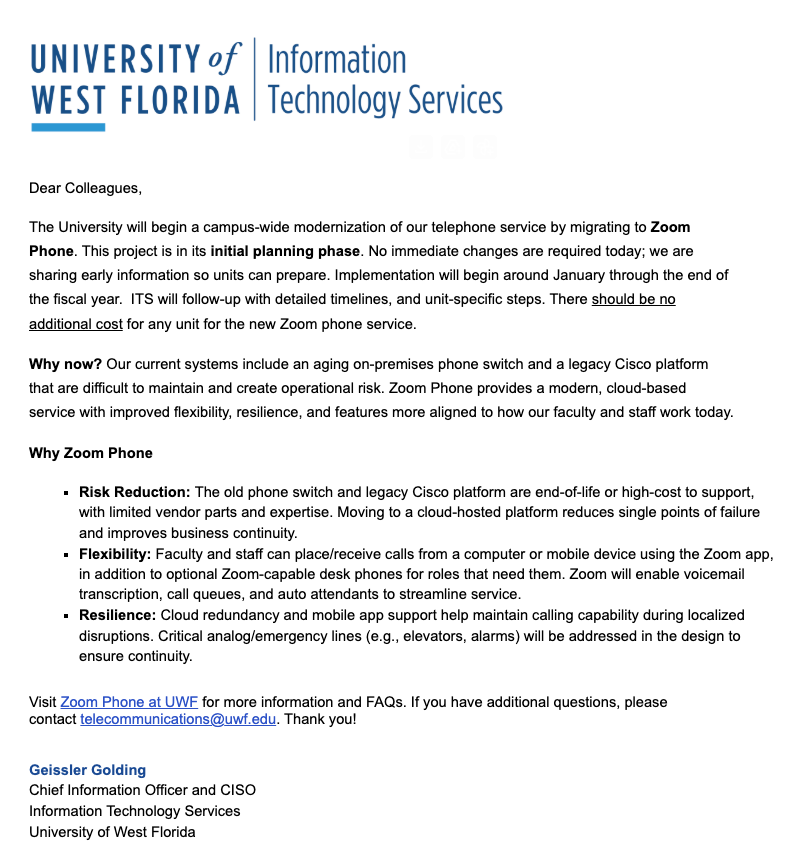
This announcement was sent to VPs, Deans, Department Heads, LSPs, Business Managers, DISReps, InfoSys, and Office Admins announcing the Zoom Phone Project.
ITS will begin the migration to Zoom Phone in Spring 2026 and will contact each unit when it is time to initiate the transition. As we reach out, we will provide more detailed instructions and unit-specific guidance.
If you have budget-related questions, please contact us at telecommunications@uwf.edu.