
Overview
| Excerpt |
|---|
Donating to Argo Pantry through payroll deduction is a simple and secure process that begins in MyUWF. UWF employees choose how much to contribute. LEAD/LEAD 2 are campaigning our fellow Faculty & Staff to help create a steady source of support for students facing food insecurity or essential needs challenges by donating $1 per pay period. The process involves completing a short form within MyUWF. Once submitted, your voluntary donation is automatically deducted from each paycheck, making it an easy, ongoing way to give without any additional steps. |
Instructions
How to Set Up Payroll Deduction for Argo Pantry
Step 1: Log in to MyUWF
Step 2: Search for the Payroll Deduction Form
- In the MyUWF search bar, type “Payroll Deduction for UWF Foundation.”
- Select the appropriate result to open the Payroll Deduction Giving form.
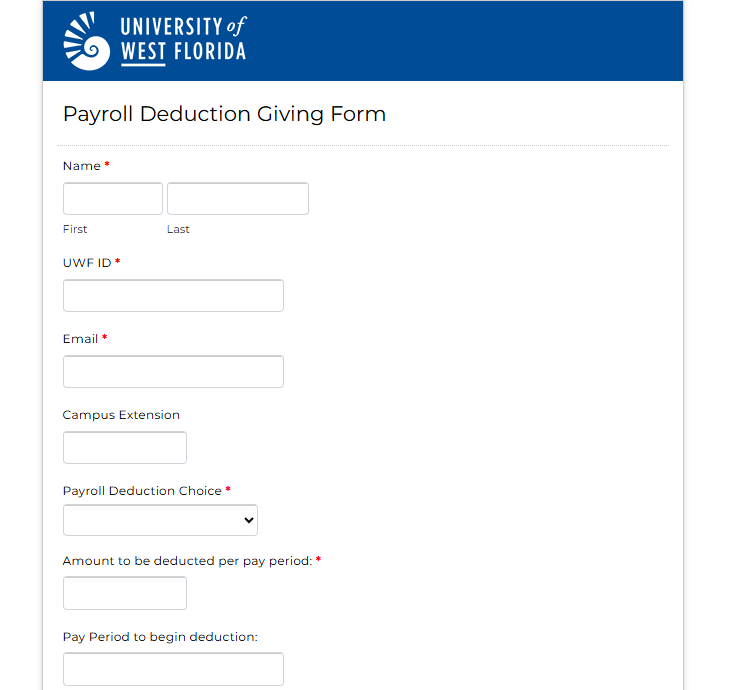
Step 3: Complete the Payroll Deduction Giving Form
- Fill out the required personal information as prompted on the form.
Step 4: Select Your Designation
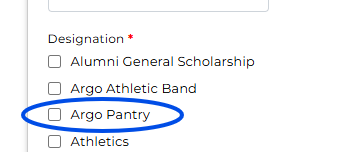
At the bottom of the form, locate the Designation section.
- Select “Argo Pantry”
Step 5: Submit the Form
- Review your information and submit the form to complete your payroll deduction setup.
Once submitted, your voluntary donation will be deducted automatically from each paycheck, helping provide food and essential toiletries to students in need.
FAQs
| Expand | ||
|---|---|---|
| ||
Your participation is completely voluntary, and you may update or discontinue your payroll deduction at any time. Simply resubmit the form and under Payroll Deduction of choice select if you want to change or cancel your deduction. |