
Overview
| Excerpt |
|---|
Donating to Argo Pantry through payroll deduction is a simple and secure process that begins in MyUWF. UWF employees choose how much to contribute. LEAD/LEAD 2 are campaigning our fellow Faculty & Staff to help create a steady source of support for students facing food insecurity or essential needs challenges by donating $1 per pay period. The process involves completing a short form within MyUWF. Once submitted, your voluntary donation is automatically deducted from each paycheck, making it an easy, ongoing way to give without any additional steps. |
Instructions
How to Set Up Payroll Deduction for Argo Pantry
Step 1: Log in to MyUWF
Step 2: Search for the Payroll Deduction Form
...
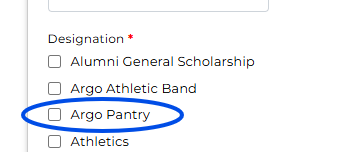
Step 4: Select Your Designation
At the bottom of the form, locate the Designation section.
Choose “Other” from the list.
A text box will appear.
In that text box, enter “Argo Pantry.”
- Select “Argo Pantry”

Step 5: Submit the Form
- Review your information and submit the form to complete your payroll deduction setup.
...